Keys and costs
Get a Claude API key
Create a Claude API key in the Claude Console and connect it to Card Cabinet, so Claude can read the cards you scan. You pay Anthropic only for what you use.
On this page
When you scan a card, Card Cabinet first asks eBay's image search which listings look like it. Claude, Anthropic's AI model, can also read the card directly: player, year, set, number and parallel. It's most useful for cards eBay isn't sure about, such as vintage cards, oddball sets and parallels.
Every account can use Claude through the free monthly allowance. With your own key there's no monthly scan limit, and you pay Anthropic directly for what you use, with no subscription.
| Model in Card Cabinet | Good for | Roughly costs |
|---|---|---|
| Sonnet 5.5 · most accurate | Vintage cards, parallels, hard-to-read cards | about $4 per 1,000 scans |
| Haiku 4.5 · cheaper | Modern base cards | about $2 per 1,000 scans |
With Use it set to Only when eBay is unsure (the default), Claude only runs on the scans that need it, so most collectors spend well under these figures.
1. Sign in to the Claude Console
Go to platform.claude.com and sign in, or create an account. This is Anthropic's site for developers; you can use the same email as your claude.ai account.

2. Add a little credit
Open Settings → Billing, choose Buy credits, and buy a small amount with a card. A few dollars covers hundreds of scans. Credits are available straight away; Anthropic doesn't refund them, and they expire a year after purchase, so there's no reason to buy much at once.
While you're there, you can set a monthly cap: in Spend limits, choose Set limit and enter an amount. When usage reaches it, the API stops until the next month, so Card Cabinet can never spend more than you chose. Card Cabinet also shows what your key has spent this month in Settings.
3. Create an API key
Open Settings → API keys and click Create key. Give it a name such as "Card Cabinet", choose when it expires (or no expiry), and leave Linked account set to yourself.

4. Copy the key
The Console shows the whole key once, right after you create it. It starts with sk-ant-. Copy it now: if you lose it, you can't view it again, but you can always create a new one and delete the old one.

5. Paste it into Card Cabinet
In Card Cabinet, open Settings and scroll to AI card identification:
- Paste the key into Claude API key.
- Choose a Model: Sonnet 5.5 (most accurate) or Haiku 4.5 (cheaper).
- Choose when to Use it: Only when eBay is unsure, On every scan, or Never.
- Choose Save and test. Card Cabinet sends Claude a one-word test message (a tiny fraction of a cent) and saves the key only if it works.
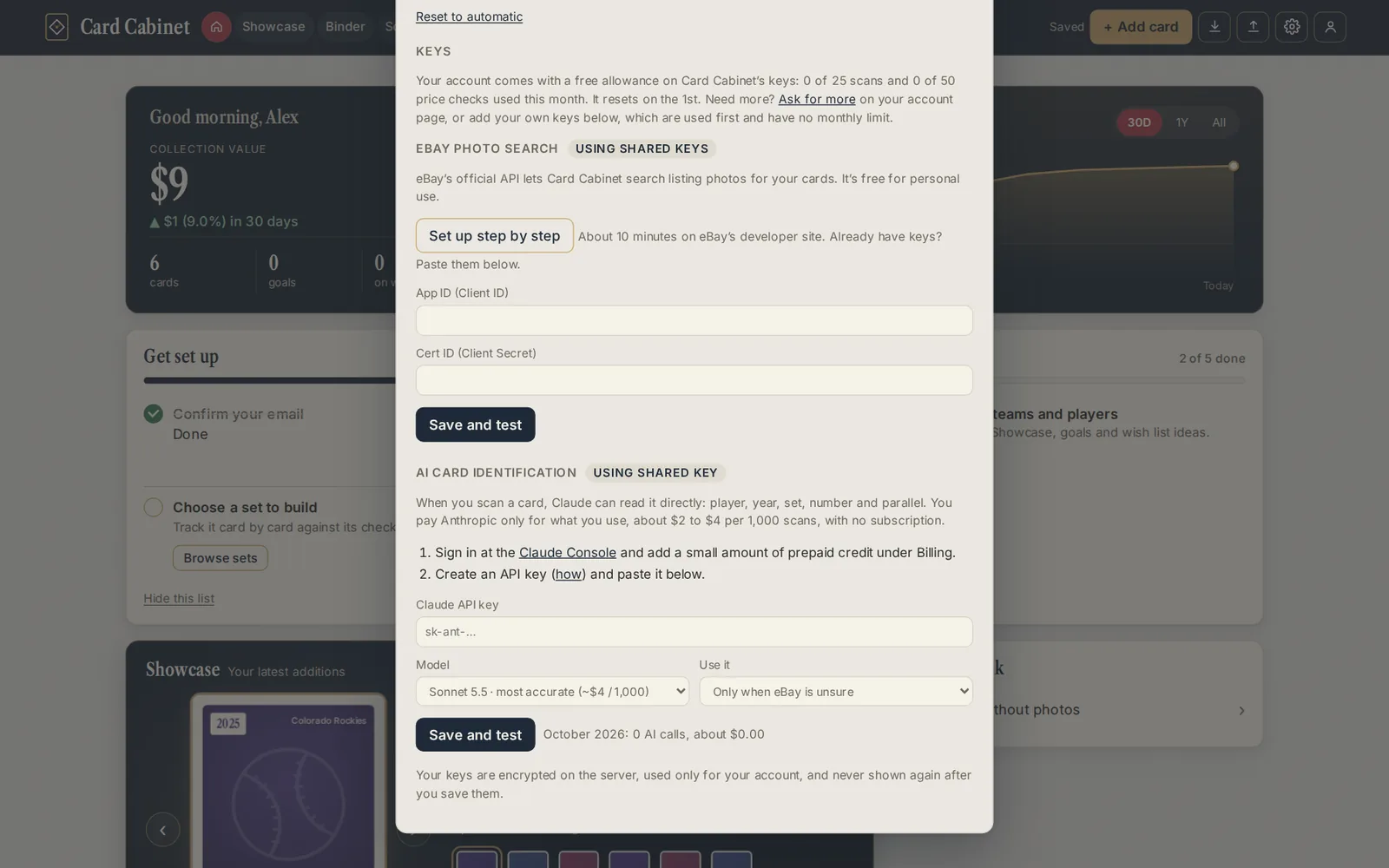
Your key is encrypted on our server, used only for your account's scans, and never shown back to you. Below the fields, Settings shows how many AI calls your key made this month and about what they cost. To stop using it, choose Remove my key, and delete the key in the Claude Console too if you no longer need it.
If something goes wrong
- "Claude didn't accept this key (401)": the key was copied incompletely or has been deleted. Create a new one.
- A billing or credit message: add credit on the Billing page (step 2).
- A usage limit message: you've reached the spend limit you set. Raise it in the Console, or wait for the new month.
See also: How keys and the free allowance work, Scanning a card and Get your own eBay keys.
Steps checked against Anthropic's Claude documentation on 5 October 2026. Updated 2026-10-05.