Adding cards
Importing a spreadsheet
Bring in a collection you already keep in Excel, Google Sheets, Numbers or another app, as CSV or Excel.
If you already keep a list of your cards, you don't need to type it again. Card Cabinet reads spreadsheets and lets you match your columns to its fields.
What it accepts
CSV and tab-separated files, and Excel and OpenDocument workbooks: .csv, .tsv, .txt, .xlsx, .xlsm, .xls and .ods. From Google Sheets, use File → Download → Comma-separated values. From Numbers, File → Export To → CSV.
Starting from scratch? Download a blank template on the Import screen gives you a CSV with the right columns.
Import, step by step
- Open Import (on a phone: More → Import a spreadsheet).
- Drop your file on the page, or choose Choose file.
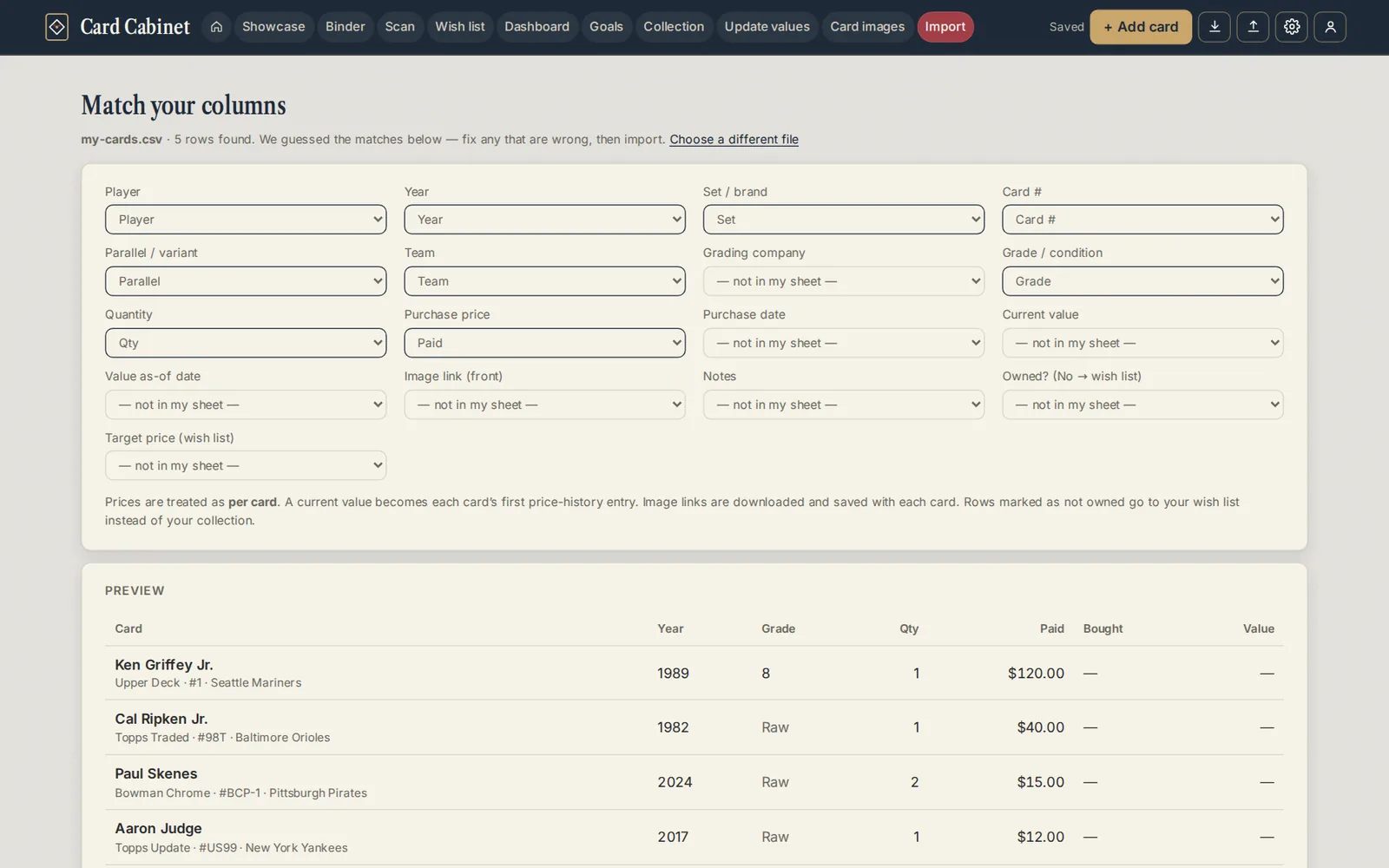
- On Match your columns, check each of Card Cabinet's fields against the column it guessed from your headers. Fix any that are wrong, or choose — not in my sheet —. If the workbook has several sheets, pick the right one.
- Look over the preview of the first rows.
Choose whether to Add to my existing cards or Replace my collection. Replacing asks first, and your current cards go to Recently deleted for 30 days.
When adding, rows that match cards you already have are listed under Already in your cabinet. Choose Skip them, Add to the quantity or Add them as separate cards.
- Leave Find real photos for these cards after importing ticked if you'd like Card Cabinet to look for photos on eBay.
- Choose Import. The button says how many cards (and wish list cards) it will add.
Fields you can match
Player, Year, Set / brand, Card #, Parallel / variant, Team, Grading company, Grade / condition, Quantity, Purchase price, Purchase date, Current value, Value as-of date, Image link (front), Where it is, Tags (separated by commas), Notes, Owned? (No → wish list) and Target price (wish list).
How your data is read
- Prices are per card, not per row total.
- Current value becomes the card's first price-history entry.
- Image link photos are downloaded and saved with the card.
- Rows with Owned? set to No go to your wish list.
- "PSA 9" in a grade column is split into grading company and grade.
- "1989 Upper Deck" in a set column is split into year and set.
The first row with two or more filled cells is taken as the header row, so a title line above your headers is fine.
After the import, Card Cabinet opens the Showcase with your cards. Imported the wrong file? Choose Undo on the message that appears, or find the import in Recent changes for 30 days.
If you asked for photos and eBay is set up, photo sync starts straight away.
Updated 2026-10-05.